Drum scanning

nikki

Popular Poster
Registered User
Joined
Jul 16, 2021
Messages
59
Finally, 11 months after we got it (long story multiple reasons including health) our Howtek 4500 is finally up and running! We are, as the fluffies would say "embarking on a journey!"

We have plenty of scanning experience, but drum scanning is a whole different level.... we will never stop learning!

Richard did write a little blog if you are interested:


We will be offering this as a service, but only when we are happy to do so! To help us to get to that stage, we may offer some "help us out deals" so that we can get your feedback on whats right and whats not!

Please follow us on facebook, instagram and/ you tube to watch our progress either good or bad!

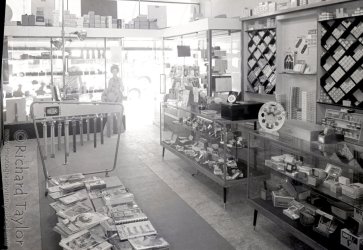
Attached are a couple of scans, the first was on an Epson V700, the second on the Howtek! The detail quality is astonishing, well we think so anyway. The negative we used was shot in 1962.

If this may be of interest too you, please do get in touch, we need to learn but we also need constructive feedback which means there are deals to be done we hope!
 

Attachments

  • 642862857_1516564273805453_9191770555425793233_n.jpg
    642862857_1516564273805453_9191770555425793233_n.jpg
    177.7 KB · Views: 34
  • 642411914_1516564600472087_2656410689315010538_n.jpg
    642411914_1516564600472087_2656410689315010538_n.jpg
    210.9 KB · Views: 34
Wow, quite the difference and a proper camera shop by the looks of it.
 
Finally, 11 months after we got it (long story multiple reasons including health) our Howtek 4500 is finally up and running! We are, as the fluffies would say "embarking on a journey!"

We have plenty of scanning experience, but drum scanning is a whole different level.... we will never stop learning!

Richard did write a little blog if you are interested:


We will be offering this as a service, but only when we are happy to do so! To help us to get to that stage, we may offer some "help us out deals" so that we can get your feedback on whats right and whats not!

Please follow us on facebook, instagram and/ you tube to watch our progress either good or bad!

Attached are a couple of scans, the first was on an Epson V700, the second on the Howtek! The detail quality is astonishing, well we think so anyway. The negative we used was shot in 1962.

If this may be of interest too you, please do get in touch, we need to learn but we also need constructive feedback which means there are deals to be done we hope!
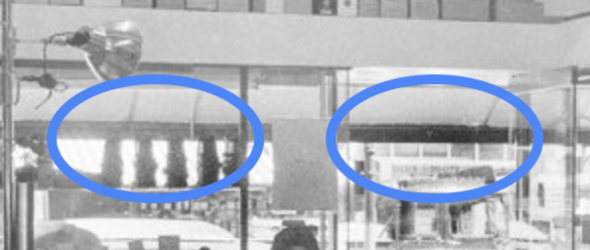
I;m sure the drum scanner is better. But the blown details outside the store on the V750 scan vs the drum doens;t make sense. How can you capture those detail on the drum and not on the V750? The scanner settings or the post-scan editing are incorrect.

How did you scan with the V750? What were the settings? How did you edit?
 
I;m sure the drum scanner is better. But the blown details outside the store on the V750 scan vs the drum doens;t make sense. How can you capture those detail on the drum and not on the V750? The scanner settings or the post-scan editing are incorrect.

How did you scan with the V750? What were the settings? How did you edit?
Now that I think about it I completely agree with you about the blown highlights.
 
The drum scanner should be expected to do better than the Epson in terms of scanning through the high density areas of those blown highlights.

However, in this example there is clearly some software editing going on which is locally reducing the brightness of the area through the open shop door on the drumscan - you can see that the dark edge of the awning in the street visible through the open door is noticeably darker than the same thing through the window. Presumably in real like and on the negative these two dark areas are the same tone. Hence this isn't an exact like-for-like comparison of 'straight' unedited scans (if indeed such a thing is possible). Granted, the Epson scan won't have that the detail there to recover or massage with software in the first place though.

Screenshot 2026-03-02 at 11.26.51.png
 
I think there is a duo scan option with the V800 at least whereby it does a standard scan and then another one to get more detail in the highlights via Vuescan. It's a bit hit and miss to get it working.It then merges the 2 scans together to get a HDR version of the scan.
 
I think there is a duo scan option with the V800 at least whereby it does a standard scan and then another one to get more detail in the highlights via Vuescan. It's a bit hit and miss to get it working.It then merges the 2 scans together to get a HDR version of the scan.
I never believed this Vuescan claim nor saw results that beat a single scan. It;s a convenient selling point for Vuescan but show me the meat. The scanner's dMax is set for maximum. It will pull out as many details in the darker areas as the scanner can in a single scan, since it is factory-calibrated that way. How would a second scan get more details without distortion and noise?
 
I think Vuescan claims it can do something similar with my 4990 but the last time I tried using it to get more shadow detail out of a transparency I don't think it made any difference whatsoever. I don't think these scanners have any sort of actual hardware gain or hardware exposure control or anything like that, they just scan at one exposure level and everything like setting the black point and white point in the software is just 'post' - same as my Imacon in fact. So it's not surprising that it doesn't work.

Maybe from a software point of view it works if it does indeed make two scans then combines them, just it's combining two identical scans.

The only thing I've ever managed to do with the Epsons to get better results out of dense transparency shadows is to scan at the full resolution (in the case of my 4990 this is 4800dpi) then set Vuescan to downsample to 2400 when writing the tiff file. This doesn't lose you any detail because the scanner can't actually resolve more than 2000-ish anyway, but it cuts the chroma noise in the shadows significantly.
 
I think Vuescan claims it can do something similar with my 4990 but the last time I tried using it to get more shadow detail out of a transparency I don't think it made any difference whatsoever. I don't think these scanners have any sort of actual hardware gain or hardware exposure control or anything like that, they just scan at one exposure level and everything like setting the black point and white point in the software is just 'post' - same as my Imacon in fact. So it's not surprising that it doesn't work.

Maybe from a software point of view it works if it does indeed make two scans then combines them, just it's combining two identical scans.

The only thing I've ever managed to do with the Epsons to get better results out of dense transparency shadows is to scan at the full resolution (in the case of my 4990 this is 4800dpi) then set Vuescan to downsample to 2400 when writing the tiff file. This doesn't lose you any detail because the scanner can't actually resolve more than 2000-ish anyway, but it cuts the chroma noise in the shadows significantly.
When I tried downsampling from 4800 to 2400 using a V850, I found the downsampled image at 2400 wasn't as sharp as the one scanned at 2400. I don't know why that is.
 
When I tried downsampling from 4800 to 2400 using a V850, I found the downsampled image at 2400 wasn't as sharp as the one scanned at 2400. I don't know why that is.
It might be that the V850 is resolving a bit more than 2400 so you're losing some. On my 4990 (and when I was using a borrowed V700) it wasn't so oversampling then downsizing to 2400 didn't lose anything. I suspect my machine is resolving around 2000dpi tops, although having said that my Imacon scans at 2000 are sharper.
 
Back
Top