Corners of negatives cut off

Soulstar89

Popular Poster
Registered User
Joined
Oct 23, 2024
Messages
229
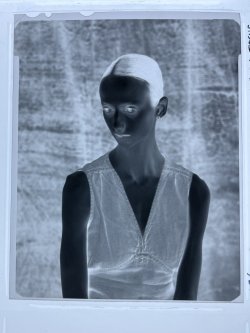
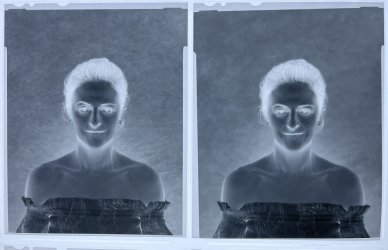
Ive noticed that sometimes the corners of my negatives are cut off so the whole frame doesn’t have four pointed edges.

I used three film holders on a continuous lighting class with my wista vx. All six frames came out with the corners cut. I shot around f16 with my nikkor 210mm. I picked up a sinar p2 and used the same holders to test the camera and lens it came with. No cut corners.

I looked through my folder and sometimes I see no cut corners and sometimes I don’t . Has anyone an idea what the cause is? Most my lenses image circle exceed the movements of my wista.

Examples:
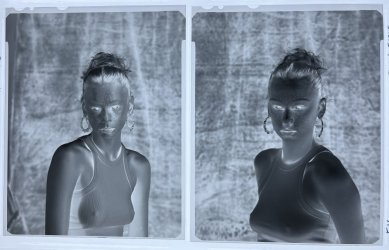
IMG_2022.jpegIMG_2024.jpegIMG_2023.jpeg
 
That Nikon will be pretty much covering 10x8" at those sorts of focus distances, so you can rule out coverage issues. You're not using a very narrow long lenshood are you? To be honest the edges look too sharply defined for that even.
 
That Nikon will be pretty much covering 10x8" at those sorts of focus distances, so you can rule out coverage issues. You're not using a very narrow long lenshood are you? To be honest the edges look too sharply defined for that even.
Hey Dave. No I’m not using a lenshood.

I’m out of ideas. Ian has a Wista dx but I think the rear standard functions differently.
 
Umm , the cut corners look like they have a radius - similar to the opening of the revolving back? I would have a spare undeveloped sheet or peice of paper in a holder with the dark slide out and look through the lensboard hole to see if there was any obstruction .
 
As far as I remember the revolving back sliding bars are at 4 corners and can be pushed in further than they need to be , they are silver on a Wista 45N , they hold the revolving halves together
 
I've never seen this before.

I agree with Dave about how sharply defined the corner cut-offs are and also about their symmetry.
Since it doesn't appear to be the holders, and not the Sinar, it looks like the Wista and in all probability some kind of obstruction in very close proximity to the film holder/plane.
 
I can't talk about the Wista, but it's common on the Linhof Technika.

It's caused by the rotating back mechanism.

Mike
 
Thanks for the suggestions of causes. The wista is a Japanese version of the linhof.

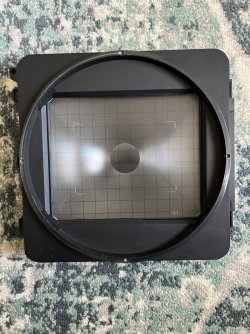
Just took the back off and the corners of the ground glass is cut off from the circular rotating back function.
IMG_2026.jpeg

Took another closer look at my film folder and the negatives that aren’t missing the corners of frame are with my 90mm lens. 135 and 210 have corners missing, 210 being more evident. Interesting.
 
I can't talk about the Wista, but it's common on the Linhof Technika.

It's caused by the rotating back mechanism.

Mike
Hey Mike seems the wista had the same issue. Is it something you just live with or a possible work around?
 
It makes sense on the longer lens , it’s a similar restriction with the expansion backs for 6x17 the longer lenses are impacted I would have imagined that the limit for no restriction would have been 180mm as the RF model has frames for 135/150/180.
You could tell folks that they were shot with a Leica M3 so that’s how they come out with the curvy corners from the rangefinder but it’s not April the 1st any more
 
Doesn't happen with my Wista 45DX, but that is not a revolving back, But it doesn't occur with any other of my cameras with revolving backs.

Ian
 
I can't talk about the Wista, but it's common on the Linhof Technika.

It's caused by the rotating back mechanism.

Mike
As I'd expected, no missing corners on the negs from my Linhof MT. All shot with 150mm and wider, nothing longer.

If I'd had missing corners, I'm sure I would have posted. :)
 
Doesn't happen with my Wista 45DX, but that is not a revolving back, But it doesn't occur with any other of my cameras with revolving backs.

Ian
Hey Ian. I didn’t expect the dx to exhibit this. I used one for the first time last month.

I’ve no idea what it is. The camera was basically new old stock. My neighbor got it boxed from Japan, used it a few times then put it away. It was my first large format so I only compared once I got the sinar p2 and developed negatives.
 
Reality is it looks worse than it really is, as you have two clear edges where the film is held in the holder. Enlarger and scanner negative holders crop in slightly as well. In addition, a GG screen also crops slightly.

So you may be over thinking what's not really an issue.

Ian
 
Reality is it looks worse than it really is, as you have two clear edges where the film is held in the holder. Enlarger and scanner negative holders crop in slightly as well. In addition, a GG screen also crops slightly.

So you may be over thinking what's not really an issue.

Ian

The only reason I asked is if I scan using the Epson film holder or tape negative to separate glass then in photoshop select 4x5 crop ratio, the corners are always black. I normally crop in to remove the black corners. Not over thinking just wanting to see if I’m doing something wrong and if so what can I improve on.

when I used the dx, i appreciated how good the vx is for my needs. Movements was like focus to eye and swing to rear eye are seemless on vx. Right tool for the right job I guess.
 
As I'd expected, no missing corners on the negs from my Linhof MT. All shot with 150mm and wider, nothing longer.

If I'd had missing corners, I'm sure I would have posted. :)
It's something i just live with.

I notice it most when using the Nikkor 210/5.6.

Wider lenses don't seem to have the issue.

Mike
 
Back
Top